
Studyland is a full-stack, real-time social study platform designed to help users track their study hours, analyze their performance, and study alongside friends in virtual rooms.
Built with a focus on Clean Architecture utilizing Vertical Slices and Domain-Driven Design (DDD) principles, it leverages the power of .NET 9 for a robust backend and React 19 for a high-performance, responsive frontend.
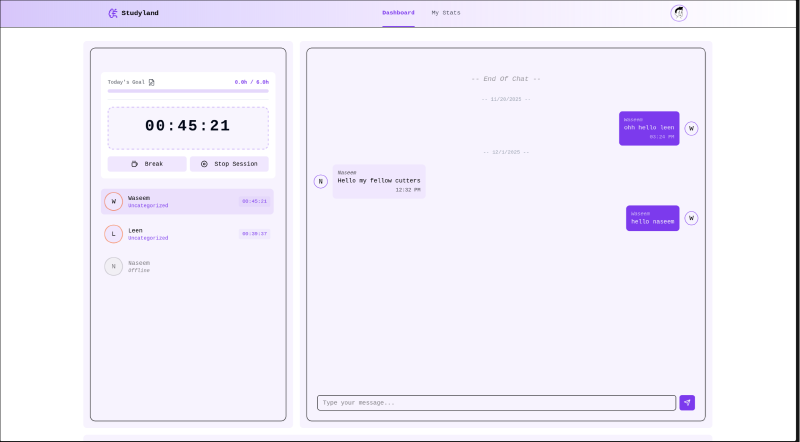
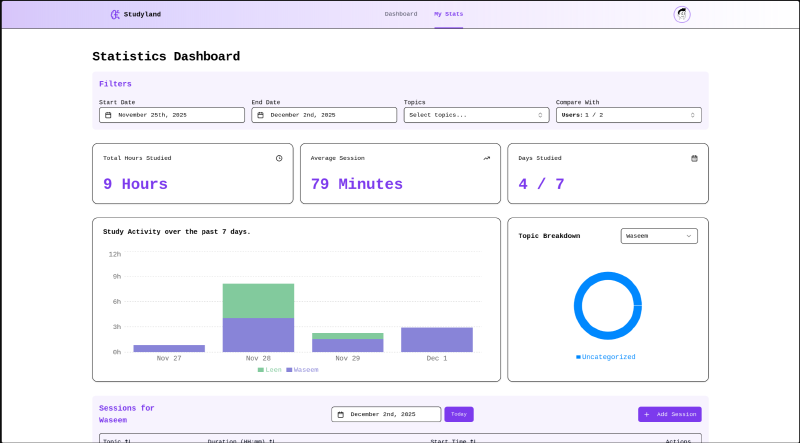
Live Demo & Access#
Live URL: studyland.rufususmle.com
To immediately explore the real-time features and architecture of the platform, use the dedicated demo account:
- Email:
demo@example.com - Password:
demouser
Architecture: Clean Architecture & Vertical Slices#
The solution follows a strict Clean Architecture approach, further organized by Vertical Slices within the Application layer. This ensures that all logic related to a specific feature (e.g., “Sessions”) is cohesive and easy to maintain.
Backend Layers#
Domain: The core of the application. Contains enterprise logic and entities (User,Session,Topic) with zero external dependencies.Application: Implements business logic using CQRS (Command Query Responsibility Segregation) via MediatR.- Vertical Slices: Features are organized by domain area, keeping related logic together.
- Behaviors: Cross-cutting concerns like Validation are handled via MediatR Pipeline Behaviors.
Persistence: Implements database access using Entity Framework Core with SQL Server.API: The entry point, containing minimal controllers that delegate execution immediately to MediatR.
Core Features#
- Real-time Presence: Users can instantly track the status of friends (Studying, On Break) via a high-performance, in-memory SignalR Presence System.
- Advanced Analytics: Tracks study sessions by topic and time, generating robust analytics for personalized dashboard insights.
- Full-Stack Type Safety: Utilizes auto-generated API clients and type-safe SignalR wrappers to ensure zero-tolerance for contract drift between C# and TypeScript/React.
End-to-End Type Safety#
One of the project’s core philosophies is eliminating “magic strings” and runtime errors through rigorous type safety across the full stack.
1. Auto-Generated API Client#
The API endpoints return DTOs with precise annotations. We utilize the OpenAPI specification generated by the backend to automatically build the frontend client.
- Tooling:
openapi-typescript-codegenscans the live Swagger/OpenAPI JSON. - Benefit: This generates a fully typed Axios client for React. If a DTO property changes in C#, the frontend build will fail immediately, guaranteeing perfect synchronization between backend and frontend.
2. Type-Safe SignalR Wrapper#
Standard SignalR calls like hub.invoke("MethodName") are error-prone. I implemented a generic TypeScript wrapper to enforce type safety on real-time events.
- Implementation: By defining interfaces for
ServerToClientEventsandClientToServerEvents, the wrapper ensures that you can only invoke methods that actually exist on the Hub, with the correct payload types.
Deep Dive: Real-Time State Management (SignalR)#
One of the most complex parts of Studyland is managing the real-time state of users (Online, Studying, On Break) without overloading the database. This is achieved through a sophisticated in-memory state machine supported by background workers.
1. The PressenceService (Singleton)#
This service acts as the source of truth for all active WebSocket connections.
- Connection Mapping: It maintains concurrent dictionaries to map
ConnectionId↔UserId↔ChannelId. - State Management: When a user joins, their profile is fetched from the DB once and cached. Subsequent updates mutate this in-memory state, ensuring O(1) performance.
2. Custom Hooks (usePressence)#
On the frontend, complex real-time logic is abstracted into custom hooks like usePressence.
- Role: Manages the subscription to SignalR events and synchronizes local React state with the server’s in-memory presence list, keeping UI components declarative.
3. Background Jobs (Hosted Services)#
To maintain data integrity and automate state transitions, two IHostedService jobs run in the background:
ZombieSessionsKiller: Runs periodically to identify “orphaned” connections (users with no active SignalR socket) and cleanly removes them or stops their study session, ensuring accurate room listings.StudyTimerMonitor: Scans the in-memory state for expired timers. It automatically transitions users from “Studying” to “On Break” and broadcasts the update to the room, ensuring synchronized timer states for all peers.
UI/UX & PWA#
The frontend is designed to be beautiful, responsive, and app-like.
- Stack: Built with Shadcn UI and Tailwind CSS for a modern, accessible, and clean aesthetic.
- Animations: Utilizes Framer Motion for smooth transitions and interactive feedback.
- PWA (Progressive Web App): Fully optimized to run on all devices. Installable and responsive, providing a native mobile app experience directly from the browser.
Custom Validation Extensions#
To keep validation logic readable and expressive, custom extension methods were built for FluentValidation.
.Required(): A shorthand that combines.NotEmpty()with a standardized error message format..MustExistInDb<T>: A powerful generic extension that validates foreign keys. It takes a genericDbSet<T>and automatically performs an asynchronousAnyAsynccheck against the database.
// Inside CreateSession.Validator
RuleFor(x => x.UserId)
    .Required()
    .MustExistInDb(context.Users); // Automatically checks DB and returns 404-style error if missing
Setup & Installation#
To run this project locally, start by cloning the repository:
git clone https://github.com/WaseemAldemeri/Studyland.git
cd Studyland
Docker Compose (Recommended)#
This method only requires Docker to be installed and handles the database, backend, and frontend containers automatically.
docker compose -f docker-compose.prod.yml up --build -dOnce the containers are running, navigate to http://localhost:3000 and log in with the seeded demo user:
- Email:
demo@example.com - Password:
demouser
Manual Local Development#
Requires Node.js and the .NET 9 SDK.
1. Database — Install SQL Server locally or run the database only using Docker:
docker compose up -d2. Backend:
cd backend/API
dotnet restore
dotnet watch run
3. Frontend:
cd frontend
npm install
npm run dev
This project is released under the MIT License.